Pipedrive review 2026: Is it the right CRM for founders?
Lightfield
Quick Summary
Pipedrive is an activity-based CRM built around visual pipelines and structured sales processes. Lightfield is a CRM that updates itself by capturing emails and meetings automatically. Both manage pipeline visibility. The difference is how the data gets there.
Ready to make the switch?
Lightfield is free to start and takes minutes to set up. No admin required, no implementation timeline.
Pipeline Visibility Requires Consistent Logging
Pipedrive helps teams organize deals with a visual pipeline and activity-based selling. The system works best when reps consistently log calls, emails, and follow-ups. That structure makes pipeline stages easy to read and reporting easy to trust—when the underlying data is current.
But that creates a common friction point. The CRM reflects what someone recorded, not always what actually happened. Conversation details, commitments made on a call, or follow-up context can remain in inboxes or meeting notes instead of appearing directly in the pipeline. For founder-led and growing sales teams moving fast across many simultaneous conversations, the gap between what happened and what was logged can widen quickly.
This review examines how Pipedrive's activity-based model performs in daily sales workflows and where manual logging can create gaps in pipeline visibility as conversations move quickly.
Why Listen to Us?

Lightfield is an AI-native CRM for B2B sales teams, from founders still closing their own deals to revenue teams with 10 to 30 sellers. We work closely with teams evaluating tools like Pipedrive and other pipeline CRMs as their sales process grows. That vantage point gives us direct insight into where these systems help organize deals and where manual activity updates still create friction in daily sales workflows—especially at the pace sales teams actually move.
What is Pipedrive?
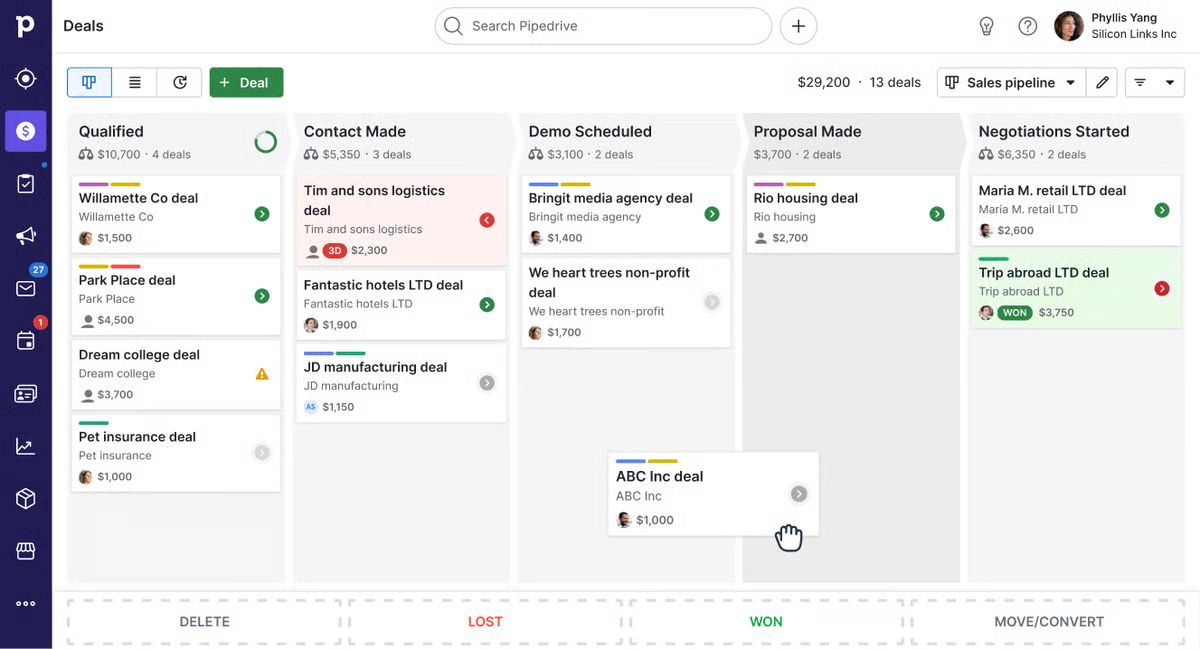
Pipedrive is a sales-focused CRM built around activity-based selling and visual pipelines. Founded in 2010 by salespeople who were frustrated with existing CRM tools, it's deliberately narrow in scope: help reps visualize where deals stand, remind them what needs doing next, and reduce the cognitive load of managing an active pipeline.
Over 100,000 companies use Pipedrive. It's a common upgrade path from spreadsheets or lightweight contact managers, and its shallow learning curve means most teams can be live within an hour. The drag-and-drop pipeline interface is one of the most intuitive in the category.
Pipedrive now sells four plans: Lite, Growth, Premium, and Ultimate. It has added AI features across plans, including AI report creation, AI email tools on Premium, and a built-in meeting intelligence tool called Nova.
Key Features
- Visual sales pipeline: Drag-and-drop Kanban board with customizable deal stages, deal rotting indicators to flag stalled opportunities, and multiple pipeline support across all plans.
- Lead and activity management: Leads Inbox separates early prospects from active deals, with task scheduling, reminders, and calendar sync for follow-up management.
- Workflow automation and AI assistant: Rule-based automations on Growth and above, plus AI features including email drafting on Premium and Nova for meeting recaps and suggested CRM updates. Custom lead scoring and company data enrichment come with Premium.
- Email and communication tools: Two-way Gmail and Outlook sync, email templates, open and click tracking, a meeting scheduler, and Smart Docs for quotes and e-signatures.
Reporting and forecasting: Dashboards, goal tracking, and revenue forecasts based on pipeline performance. Report limits vary by plan (50 per user on Growth, 250 on Premium, 500 on Ultimate).
Pipedrive Pricing
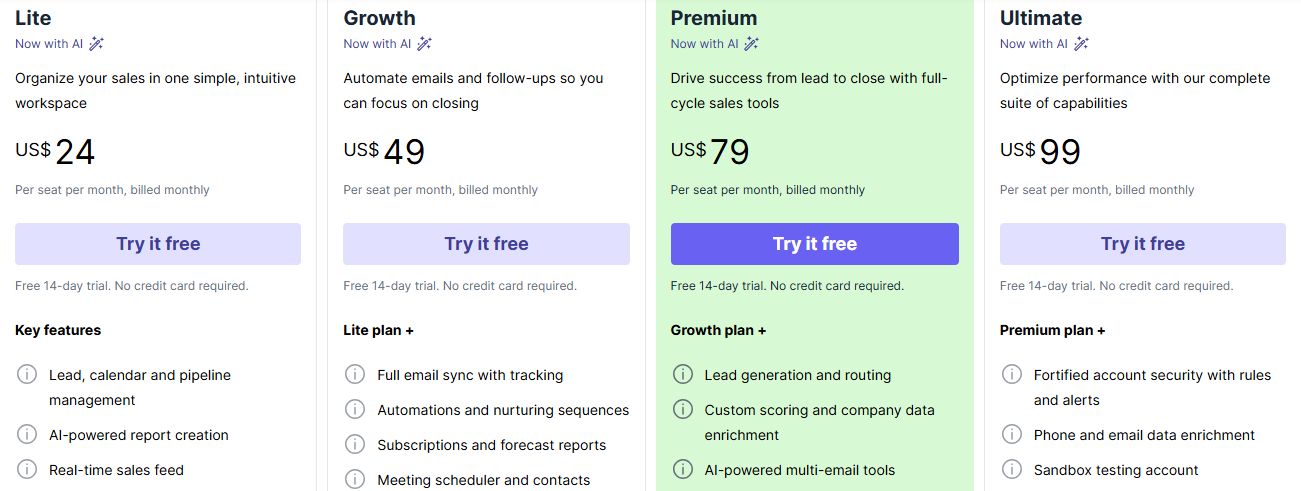
Pipedrive uses per-seat pricing with no free plan. A 14-day free trial is available on every tier with no credit card required. Pipedrive says annual billing saves up to 42% versus monthly rates. Prices below reflect annual billing.
| Plan | Annual price | Monthly price | What's included |
|---|---|---|---|
Lite | $14/seat/month | $24/seat/month | Core pipeline management, deal tracking, basic activity logging, SSO, mobile app |
Growth | $39/seat/month | $49/seat/month | Full email sync, expanded communication tools, 50 active automations, product catalog |
Premium | $59/seat/month | $79/seat/month | AI assistant, 150 active automations, revenue forecasting, LeadBooster and Projects included, phone support |
Ultimate | $79/seat/month | $99/seat/month | 250 active automations, sandbox environment, extended phone support, advanced security controls |
A few things to know before choosing a plan. Email sync is a Growth feature—Lite users get basic email tracking but not two-way sync, which means full activity logging requires the second tier at minimum. Workflow automation limits are per company (not per user), capping at 50 active automations on Growth before upgrading. LeadBooster (chatbot, prospector, web forms) is included from Premium and available as a paid add-on on lower tiers, while Campaigns (email marketing) is a paid add-on on every plan. Check which you need before anchoring to a plan price.
What We Like About Pipedrive
Pipedrive is well-designed for what it sets out to do. These strengths are genuine and hold up in daily use:
- Intuitive visual pipelines: The drag-and-drop Kanban board makes deal stages easy to understand and manage at a glance. Deal rotting indicators surface stalled opportunities without anyone having to run a report.
- Clear lead separation: The Leads Inbox keeps early prospects outside the main pipeline until they're qualified, reducing clutter in the active deal view.
- Automation builder: Rule-based workflows on Growth and above reduce repetitive actions—stage changes, task assignments, internal notifications—once processes are defined and configured.
Strong reporting basics: Dashboards and forecasting provide meaningful pipeline visibility for sales managers, with plan-tiered report limits that scale with team needs.
What We Don't Like About Pipedrive
These limitations show up in practice, particularly for teams running high-volume, fast-moving conversations:
- Process dependency: Pipeline accuracy relies on consistent activity logging or up-front automation setup. When reps miss updates—common in high-velocity selling—the CRM stops reflecting reality, and forecasting degrades.
- Activity-driven model: Sales often moves faster than structured logging allows. A quick call that changes deal scope, an email thread with a new stakeholder, an informal commitment—none of these show up in the pipeline unless someone manually records them or an automation is already in place to capture them.
- Context loss risk: Conversation insights from emails can remain in inboxes unless someone moves them into Pipedrive. Pipedrive's Nova tool records and transcribes meetings and drafts CRM updates for review, but it builds those suggestions from meeting transcripts only, not from synced emails, and every suggestion needs approval before it is saved.
Add-on complexity: The Lite plan's baseline is functional but limited. Email sync and revenue forecasting start on Growth, and custom scoring and AI email tools start on Premium. LeadBooster and Campaigns can add further cost. Teams that need the full toolkit often discover they're well above the entry-level price before the system does what they actually need it to do.
Lightfield: A Pipedrive Alternative That Updates Itself
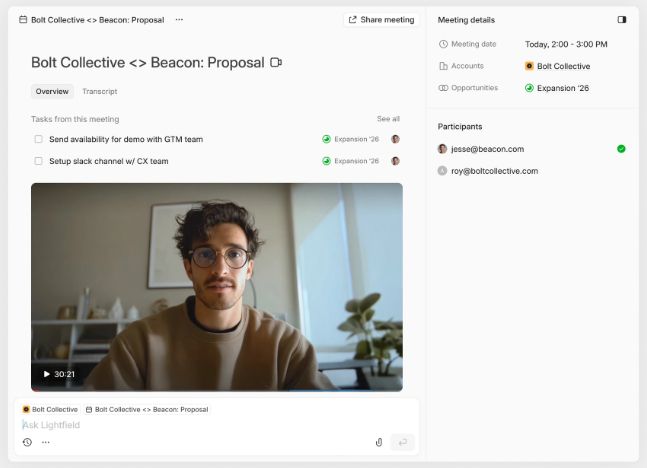
Lightfield is an AI-native CRM designed for B2B teams that want pipeline visibility without manual upkeep, from founders closing their first deals to revenue teams with 10 to 30 sellers. Instead of relying on activity logging, Lightfield captures emails, meetings, and calls directly from existing workflows and converts them into structured CRM records automatically.
There's no Kanban board to populate before the system is useful, no automation to configure before emails start logging, and no manual stage updates to maintain between conversations. The CRM builds from what's already happening.
Key Features
- Integrated call intelligence: Record, transcribe, and analyze meetings directly inside the CRM—transcripts and action items appear on the correct deal record automatically.
- AI-filled custom fields: Create a field today, turn on AI Fill, and Lightfield suggests values from new emails and meetings. Ask the agent in chat to update records from past meetings and emails.
- Automatic task extraction: Action items from conversations appear in a central task panel across accounts, without anyone manually creating them.
- Agentic chat over customer data: Ask questions in natural language and receive answers grounded in conversation history, with citations to the source email or meeting.
Schema-less setup: Start immediately and refine the data model later without losing historical context. No pipeline architecture required before the system becomes useful.
Lightfield Pricing
Starter
$89/user/month, up to 3 users. 14-day free trial.
Larger teams doing more complex agentic work can move to a team plan with unlimited viewer seats.
Pro
Visit lightfield.app/pricing for details.
Growth
Visit lightfield.app/pricing for details.
Why People Choose Lightfield Over Pipedrive
1. CRM That Updates Itself
Pipedrive's pipeline accuracy depends on reps logging activities consistently or automations being configured to capture them. When a founder is running 20 conversations in a week across calls, emails, and threads, that logging discipline is hard to maintain. Emails and meetings automatically become structured CRM records in Lightfield, keeping pipeline data aligned with real conversations instead of relying on manual activity updates—so the system reflects reality even when no one has time to update it.
2. AI-Native Foundation
Pipedrive's AI features, including deal summaries, email drafting, and the Nova meeting tool, are layered onto a traditional activity-based CRM architecture. Nova drafts CRM updates from meeting transcripts for you to approve, but data still enters the system through logged activity or approved suggestions. Lightfield is built with AI at the core: new fields can be created anytime with AI Fill turned on, which suggests values from new emails and meetings for you to review, and the system learns from interactions as they happen rather than waiting for structured input.
3. Full Conversation Visibility
Pipedrive shows activity logs, such as calls made, emails sent, and meetings scheduled. Its Nova tool adds recorded meeting transcripts and recaps, which it can save as notes on the linked deal, but Nova drafts CRM updates from meeting transcripts only, not from synced emails, so email context can still sit in the inbox. Lightfield allows teams to query their complete customer history, every email, transcript, and meeting note, and receive cited answers grounded in real conversations rather than activity metadata.
For revenue leaders
Pipedrive's pipeline is only as accurate as the activity your reps log. With 10 to 30 sellers, small gaps in logging add up to unreliable forecasts and missed follow-ups. Lightfield builds records from emails, meetings, and calls, so you review suggested updates and don't chase them. Because it keeps temporal context, you can see how a deal moved and what conversation drove each change. A RevOps leader can add custom fields and ask the agent in chat to update records from past meetings and emails, which avoids a manual backfill.
FAQs about Pipedrive
1. Can Pipedrive Automatically Log my Meetings?
Yes, with limits. With email and calendar sync enabled (available from the Growth plan), Pipedrive can log emails and import calendar events as activities, and automatically link messages to the relevant contacts and deals. Its Nova tool can also record and transcribe meetings, through a notetaker that joins Google Meet, Zoom, and Microsoft Teams calls or through a desktop app, and can save the recap as a note on the linked deal. Nova's core features are included on all plans, and suggested CRM updates are applied only after you review them.
2. Does Pipedrive Offer a Free Plan?
No. Pipedrive offers a 14-day free trial with no credit card required and full feature access during the trial period. After the trial ends, a paid plan is required to continue. The entry-level Lite plan starts at $14/user/month on annual billing or $24/user/month on monthly billing.
3. Is Pipedrive Easy to Set Up?
Yes. Its drag-and-drop pipeline and data import tools make initial setup simple—most teams can have a working pipeline in under an hour. However, getting the system to reflect your actual sales process requires configuring stages, custom fields, and automations deliberately. The out-of-box experience is good; the ongoing accuracy depends on whether that configuration is maintained as the process evolves.
4. Can Pipedrive's AI Provide Cited Answers From Meetings?
Partly. Pipedrive's Nova tool records and transcribes meetings, links action items to their moment in the call transcript, and suggests CRM updates. Pipedrive's AI assistant also suggests next actions and drafts emails. Pipedrive's public documentation does not describe asking open-ended questions across your whole meeting history and getting cited answers, which is how Lightfield's Chat works.
5. Can Pipedrive Backfill New Custom Fields Automatically?
Not in bulk. When a new custom field is created in Pipedrive, it is empty for all existing records. Populating it across historical deals requires manual updates, a bulk import, or a third-party integration. Nova can suggest values for custom fields from an individual meeting transcript, including one you upload afterward, but it does not use synced emails as a source and every suggestion needs your approval.